 Overwright
The PDF editor that gets out of your way.
Sign it, fill it, fix a line, combine the attachments, send it back. Overwright does the paperwork part of PDFs — instantly, entirely on your computer, with no account and no cloud.
Free while in preview · no account, no sign-up · first-launch steps below
Private by design
Overwright runs entirely on your computer and works with your Wi‑Fi off. No servers, no telemetry, no account. Contracts, medical forms, financials — nothing is ever uploaded, because there’s nowhere to upload it to.
Yours outright
Software the way it used to be: it lives on your machine and answers to no meter. No subscription, no login wall, nothing held back — the app you install is the entire product.
Nothing between you and done
Opens instantly. No 40‑button ribbon, no AI upsells, no loading spinner. A handful of tools that do exactly what the paperwork needs.
Everyday PDF work, minus the drama
Edit the original
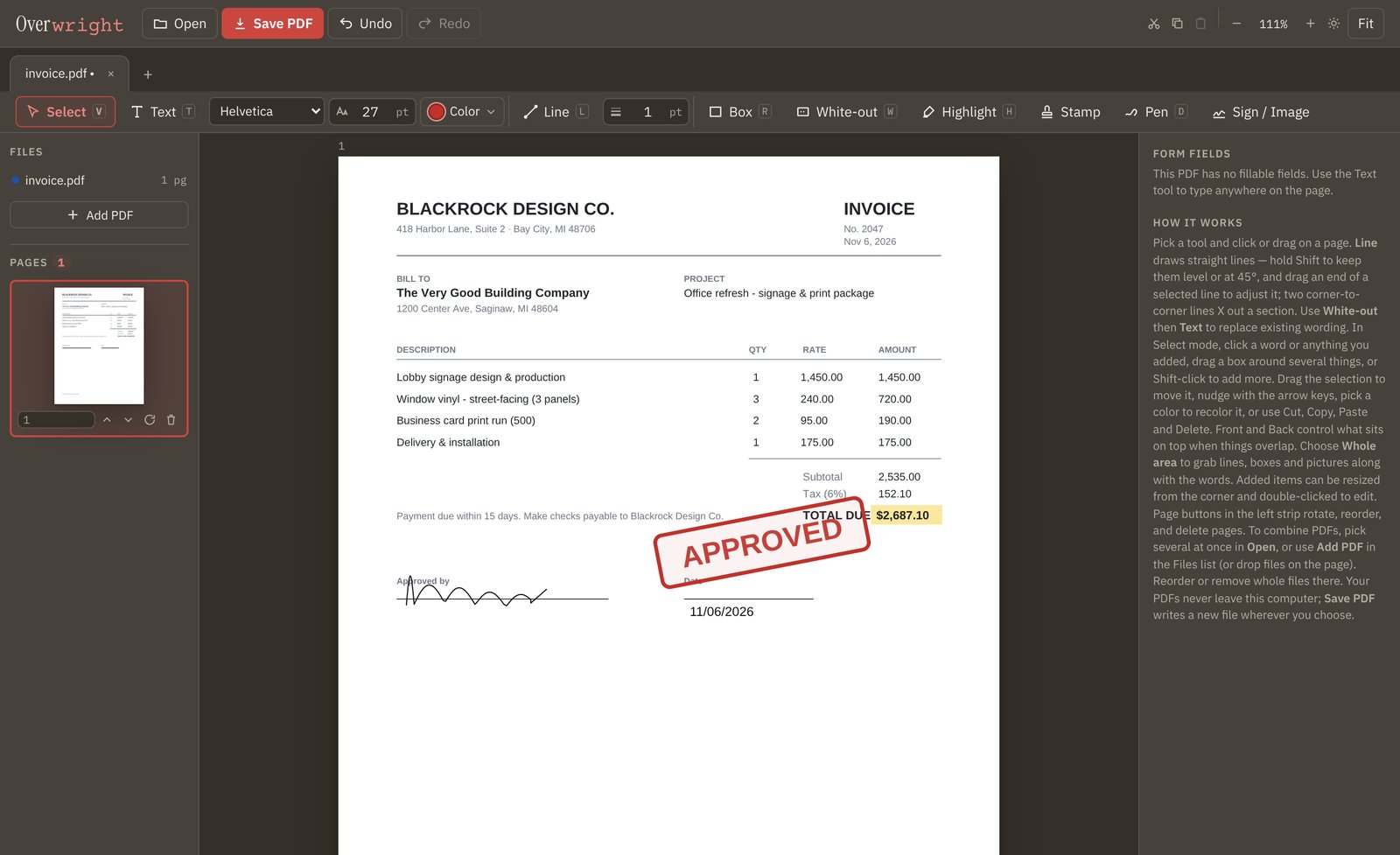
Select the PDF’s own words, lines or images — move them, recolor them, cut and paste them to another page, or erase them cleanly.
Combine & organize
Merge PDFs in the order you choose. Reorder, rotate and delete pages. Open several documents in tabs and copy-paste between them.
Add text to any PDF
Click anywhere and write — any size, font, or color. White-out a line and retype it to fix wording on the original.
Sign & fill
Draw your signature with a mouse, trackpad, or finger — it’s remembered for next time — or place a scanned one. Form fields, checkboxes and dropdowns fill right in the app.
Mark up cleanly
Highlights, boxes, freehand pen, and ruler-straight lines that snap level — X out a section and have it look intentional. Stamps and page numbers included.
Stay in control
Find anything with ⌘F. Undo and redo everything. Your original file is never touched — saving always writes a new PDF wherever you choose.
Why not just use Acrobat?
Acrobat is a fine power tool. If you live in advanced PDF production, buy Acrobat. If you mostly sign, fill, fix and combine, you’re paying every month for buttons you never press.
Download the preview
Mac
Download for MacWindows
Download for WindowsSimple and easy
One and done.
Overwright is free while in preview. Final pricing lands with our public release — and it will be a one-time purchase, not a monthly subscription.
Fair questions, straight answers
Is my document really private?
Yes — structurally, not just as a promise. Overwright has no server component and works with your internet turned off. The only copy of your document is the one on your disk.
Does it change my original file?
No. Overwright always saves a new PDF wherever you choose; the file you opened is never modified. It also warns you before closing anything with unsaved changes.
Can it edit the PDF’s original text?
You can white-out and retype wording, and select, move, recolor or erase the original content. Moved or recolored content becomes a sharp image of itself — prints perfectly, but it’s no longer searchable text. Full text reflow like a word processor is not what Overwright does.
What about scanned PDFs?
View, sign, stamp, mark up, combine and reorganize scans freely. There’s no OCR yet, so a scan’s text can’t be selected word-by-word — the area-select tool covers that instead.
Who makes this?
Overwright is built by Cowart Creative, a small independent studio in Michigan. When you email about it, a person answers — the same one who wrote the feature you’re asking about.